
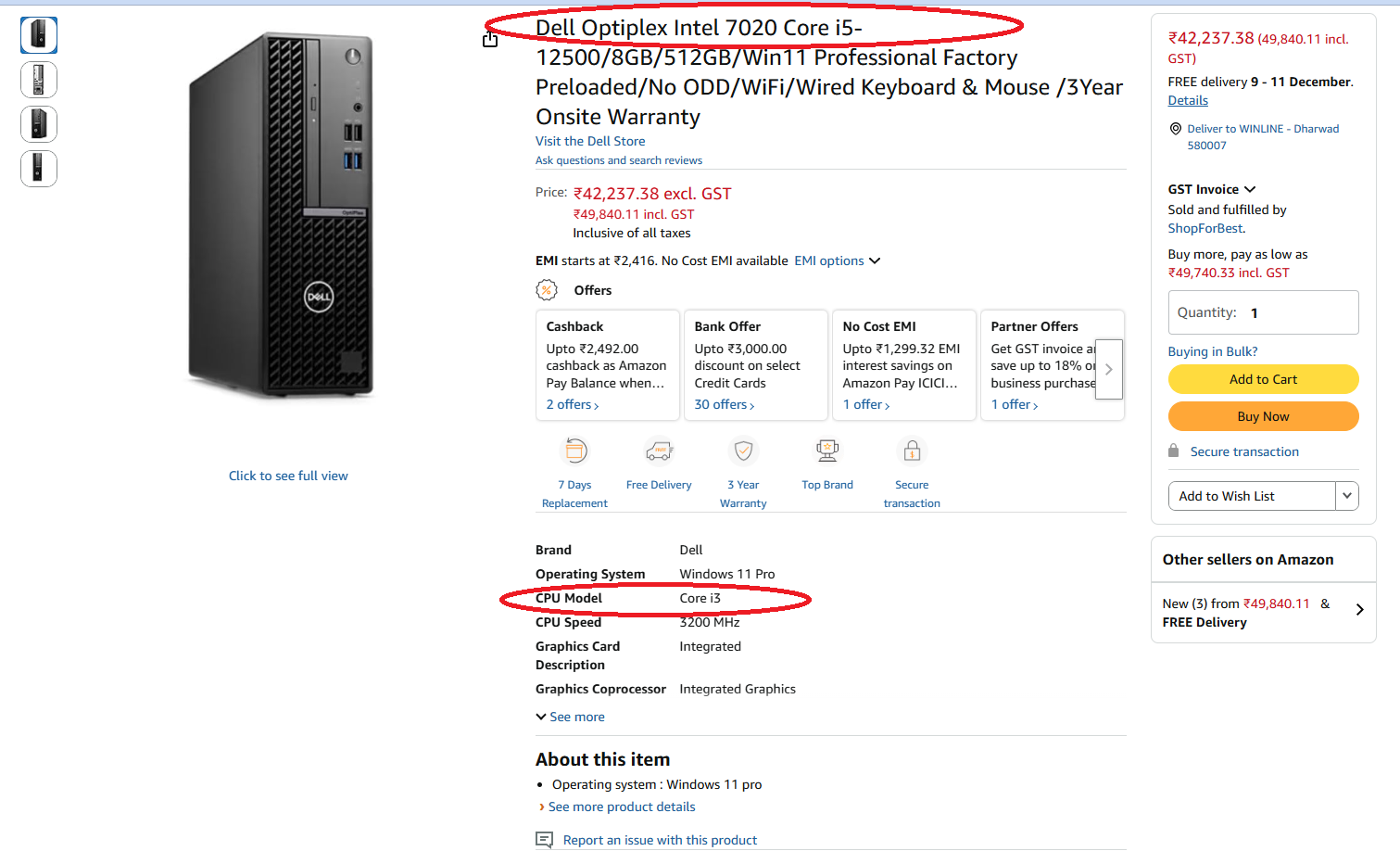
https://www.amazon.in/Dell-Optiplex-Desktop-i3-A12100-INDOpti7010MTN3-5_X/dp/B0CXXFFVN4
Link may be removed by the amazon soon, becasue we reported this to their team
Beware of “Spec Mismatch” on Online Marketplaces – A Real Dell Optiplex Example
Online marketplaces are convenient, but some listings are written in a way that can easily mislead buyers. Recently, I came across a Dell Optiplex desktop listing on Amazon where the product title loudly claimed an Intel Core i5 processor, but the detailed specifications section quietly showed an Intel Core i3 CPU model.
If a buyer only reads the big bold title and assumes the configuration, they may pay a higher price and still receive a lower-spec machine. This is exactly the kind of situation that makes customers feel cheated.
Where the Confusion Starts
- The main title highlights something like: “Dell Optiplex Intel 7020 Core i5-12500 / 8GB / 512GB / Win 11…”
- But in the specification table below, the field CPU Model is shown as Core i3.
Most normal buyers don’t scroll and compare line by line; they trust the big title. A mismatch like this can easily lead to a wrong purchase decision.
Why This Is a Serious Problem
- You are paying the price of a Core i5 desktop but may actually receive a Core i3 system.
- Core i5 and Core i3 have different performance, core counts and resale value.
- Such listings can fall under misleading advertisements / unfair trade practices if not corrected.
Even if it is “by mistake”, the loss is always on the buyer’s side – wasted money, wasted time and hassle for returns.
How to Cross-Check a PC Listing Before You Buy
- Compare the title and spec table: Make sure CPU model, generation, RAM, SSD and OS match in both places.
- Look for exact model / part number: For branded desktops, check if the listing mentions a model like “7020 SFF” plus a specific configuration code. Search that code on the brand’s official website.
- Read Q&A and reviews: Many buyers mention if they received a different configuration.
- Ask the seller in writing: Use the “contact seller” / “ask a question” option and get confirmation that the CPU is exactly what is mentioned in the title.
- Take screenshots before ordering: Capture the full page showing the title, specs, price, seller name and URL.
Keeping Solid Evidence (Very Important)
If you ever need to raise a dispute with the marketplace, seller or consumer authorities, evidence is everything. Here is how you can keep it properly:
- Full-page screenshots:
- Capture the whole product page including the address bar (URL) and as much of the specs as possible.
- If needed, take 2–3 screenshots covering the entire page from top to bottom.
- Save the page as PDF/HTML:
- Use your browser’s Print → Save as PDF option with header/footer enabled so URL and date appear on the page.
- Optional: also use Save page as… to store the HTML file of that listing.
- Keep all order documents:
- Download the invoice PDF from your Amazon orders.
- Save the order confirmation email.
- Take photos of the box, label and actual system configuration (CPU info from Windows / BIOS).
- Save communication:
- Download or screenshot any chats with Amazon support or the seller.
- If they confirm something in writing (for example “Yes, it is Core i5”), keep that safely.
- Organise everything:
- Create a folder like “Amazon-Dell-Optiplex-Config-Issue-YYYY-MM-DD”.
- Store all screenshots, PDFs, photos and chat transcripts in that folder and back it up to cloud storage.
What To Do If You Already Ordered
- Check the actual configuration:
- In Windows, open Settings → System → About or use Task Manager → Performance → CPU to see the real CPU model.
- Take a screenshot showing the CPU name and core count.
- Compare with your saved listing screenshot: If the CPU or other specs are lower, you have clear proof of mismatch.
- Raise a ticket with the marketplace:
- Use the official support / “Report incorrect product information” / “A-to-Z Guarantee” mechanisms.
- Attach your screenshots and explain that the title and specifications did not match.
- Ask for refund / replacement: Clearly state that you ordered based on the higher spec mentioned in the title.
Why Sellers Should Be Transparent
Online sellers are expected to provide accurate descriptions and not misrepresent products. When titles and specifications don’t match, buyers lose trust not only in the seller, but also in the platform and even the brand. In the long run, honest and transparent listings are the only way to build a sustainable business.
Final Thoughts
Always slow down, read every line of the configuration and keep your own evidence before placing high-value orders online. A few extra minutes of checking and a couple of screenshots can save you from a very expensive disappointment later.
Disclaimer: This post is based on my experience with a specific listing at a particular point in time. Details on marketplaces change frequently, so always re-check the current information before buying.
